How to Download Independence Day Reels From Instagram & Facebook: Step by Step Guide
Synopsis
Want an Independence Day 2026 video for WhatsApp Status? Learn how to find and download patriotic Reels from Instagram and Facebook, plus discover free Independence Day videos on Pexels and Pixabay.
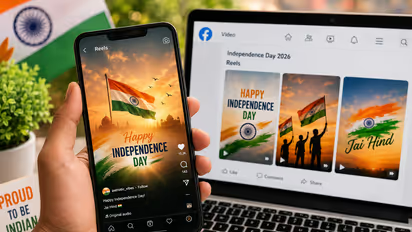
One of the events when social media gets flooded with tricolor images, patriotic songs, and small videos celebrating the occasion is Independence Day. Instagram and Facebook Reels can have lots of content related to Independence Day, and thus will be a good source to get videos for WhatsApp Status.
However, downloading a Reel and posting it are different actions. Read below on how to save videos and avoid using third-party websites.
How to Find an Independence Day Reel from Instagram or Facebook
Search Instagram or facebook for “Independence Day 2026,” “15 August status,” “Indian Independence Day” or “patriotic Reel.” Choose a Reel that will work for you and tap on the Share button. If the creator allows downloads, you might see a Download option. Note that download ability varies from video to video depending on the creator's settings.
How to Download the Reel From Instagram
- Tap on the Download button and allow Instagram to save the video to your phone's gallery or camera roll.
- In case there is no Download button available, do not use your Instagram password on a suspicious website offering downloading services.
- You may also see an option “Whatsapp status” which can be used to share the reel video directly from Instagram to your Whatsapp status.
- You can use Instagram video saver apps from playstore, where you can download all kind of public reel by coping the link and pasting it in the app.
How to Download the Reel From Facebook
- Login into Facebook and do a search for Independence Day Reels, 15 August videos or something similar. There may also be other videos available in the form of Reels suggested by Facebook.
- As soon as you find one, click the menu icon or the sharing icon. Facebook gives users the option to Save reel/save video.
- When it comes to downloading a Reel, the possibility depends upon various factors such as the content and the user account.
Download Free Independence Day Videos From Alternative Websites
To download a video instead of saving the Reel on Facebook, Pexels offers Independence Day video downloads featuring an Indian flag along with the celebrations.
Pexels – Indian Independence Day Videos
Another website where you can find numerous videos for India Independence Day is Pixabay which offers them free of cost.
Pixabay – India Independence Day Videos
Add the Video to Your WhatsApp Status
With the video saved in your phone, you should now open WhatsApp and select Updates > Status. Click the “Add Status” option and select the video you have just downloaded to add it. To get the best out of it, use a high-quality vertical video rather than low-resolution videos or very compressed videos.
Explore the latest Lifestyle NewsFood and RecipesHealth NewsAsianet News Official App