What Makes a Printer Suitable for Worksheets, Notes and Learning Materials at Home?
Synopsis
Discover what makes a printer suitable for home learning, from clear worksheet printing and easy connectivity to affordable ink costs, reliable performance and features that simplify printing study notes and school projects.
A reliable printer for worksheets, notes and learning materials should print clear text, handle regular use and keep ink costs low. An inkjet or ink tank printer with easy paper loading, scanning and wireless printing can cover most study needs at home. The right choice depends on how often you print, whether you need colour and how easily the printer fits into your daily routine.
For students, printing should be simple. Confusing settings, frequent ink changes and slow printing only make study time harder than it needs to be.
1. Look For Clear and Readable Text Printing
Worksheets and notes are mostly text and often in small fonts. The letters need to be sharp enough to read without straining your eyes.
If you are looking for the best printer for printing educational materials, focus on text quality before any fancy features. Check these points:
- Text sharpness: Small text should still be easy to read.
- Print resolution: Look at the resolution and the quality settings on offer.
- Black ink: Check what kind of ink the printer uses for everyday documents.
- Paper support: It should work well with normal printing paper.
- Print settings: Draft and normal modes should be easy to find and switch.
2. Consider How Often Study Materials Are Printed
Every home prints differently. Some families print once in a while, while others print study material almost every day.
How much you print decides which type of printer makes sense for your budget.
If you print regularly, an ink tank printer is worth a look, because you can refill its tanks from bottles. If you print only now and then, a cartridge printer may be enough, depending on its price and the cost of new cartridges.
Before you decide, think about:
- How often your child needs new worksheets.
- Whether most pages are in text or colour.
- How often you will need to buy ink.
- Whether other family members will use the printer too.
3. Check The Cost Of Printing Notes And Documents
Buying the printer is only the start. Ink and paper are costs that keep coming back, especially when students print often.
So when you judge the best printer for printing documents, look at both print quality and the ongoing cost.
A simple way to compare is the ink cost per page. Divide the price of a refill by the number of pages it should print. This gives you a rough idea of what each page costs.
Remember these points:
- Black-and-white pages and colour pages cost different amounts.
- Manufacturers measure page yield under set test conditions.
- Draft mode uses less ink, but the print looks lighter.
- Check refill prices before you buy the printer.
4. Pay Attention To Paper Handling And Double-Sided Printing
Most people don't think about paper handling when they buy a printer. But it makes a big difference when you print documents with many pages.
A good home printer should take standard paper sizes, and loading paper should be easy.
Double-sided printing is also worth thinking about. Some printers flip the page for you, while on others you have to turn the sheets yourself.
Check these points:
- Input tray: How many sheets does it hold?
- Paper sizes: Does it take the sheets you use for study material?
- Double-sided printing: Is it automatic or manual?
- Output space: Is there room for the printed pages to collect?
5. Consider Scanning And Copying Facilities
Students don't always need to print something new. Often they just need to scan, save or copy a page they already have.
An all-in-one printer does all of these tasks in one machine. Scanning turns handwritten notes into digital files. Copying lets you make extra copies of a worksheet without creating a new file.
Before you choose an all-in-one, check that the scanner fits the page sizes you use. Also check which file formats you can save your scans in.
If you rarely scan anything, a print-only printer may be enough. An extra feature is only useful if you will actually use it.
6. Choose A Printer That Works With Your Devices
Study files are usually spread across laptops, tablets and phones. Moving them to one device just to print can get tiring.
Wireless printing solves this, as long as the printer works with the devices you have at home.
When you look for the best printer for a student, check how it connects. Don't assume all wireless printers work the same way.
Check these details:
- Does it work with your computer's or phone's operating system?
- Is there a mobile printing app?
- Does it support home Wi-Fi and direct wireless connections?
- Is it easy to change the paper size and print quality?
- Do some features need an internet connection?
7. Consider An All-In-One Ink Tank Printer For Home Learning
Families with school-going children need a printer that can handle worksheets, notes and colour study material. It should also manage everyday household documents.
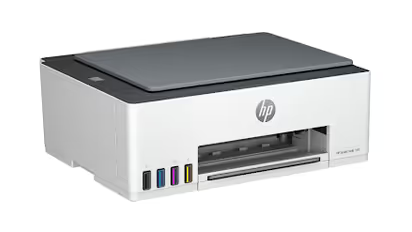
The HP Smart Tank 580 is one model to consider for these needs. It prints, scans and copies, and it supports wireless printing. It uses refillable ink tanks.
HP states a page yield of up to 8,000 black or 6,000 colour pages from the ink in the box. Your actual results will depend on what and how you print. The printer comes with a 1+1 year warranty.
Its main limitation is that double-sided printing is manual. If your family often prints long documents, a model with automatic double-sided printing may suit you better.
8. Check Maintenance And Everyday Usability
Printing a worksheet should not need a long setup every time. Ease of use matters even more when different family members share the same printer.
Look beyond the main specifications and think about day-to-day care:
- Ink refills: Learn how to refill the tanks or change the cartridges.
- Cleaning: Read the printhead cleaning instructions.
- Software updates: Check that the printer supports the devices you use at home.
- Space: Make sure the paper trays can open fully where you place it.
- Warranty support: Read what the warranty covers and how to get service.
Conclusion
A home printer for study material should make everyday printing simple and affordable. Look for clear text, low running costs, easy paper handling and reliable wireless printing. Scanning and copying are also handy when study material comes from different places.
The right printer for you depends on how often you print, whether you need colour and which devices you use at home. Compare the real specifications, refill costs and warranty terms before you decide. A printer that meets these needs will serve students and the rest of the family without any hassle.